The week before a semester starts is the worst. There are mandatory meetings about “important issues” that have absolutely nothing to do with me and my job. There are meetings about stressful things that have lots to do with me and my job. There are emails and enrollment numbers and course preparation and crises. And the part that I put off the most are the “clicky” things.
“Clicky” things, to me, are the types of tasks that you complete by clicking and typing and navigating through menus and stuff like that. Often these are things that happen on Canvas, the Learning Management System that my college uses. I change dates for assignments1. I change dates in pages. I change the order of links to resources. I change the wording in the Outcomes. I rename whole sections of links because I changed the wording of an Outcome. I have to upload new copies of my syllabus and schedule by, you guessed it, clicking through a menu and then clicking through my files.
 Photo credit: Jeswin Thomas/Unsplash
There are clicky tasks elsewhere, too. In my syllabus document. It’s a huge document, now. There are college policies and departmental policies and state-mandated sections. There’s even information about my actual course in there, if you can find it! I have to sort through it and change my office hours. Then I have to do the same thing for every class, changing the same information several times. Do my Academic Integrity policies match for all of my classes? Are they different in the ways that each course is different and then the same for the stuff that’s applicable to all of my classes?
Anyways, I changed things and some of these clicky things are a bit better now.
Accessibility
The main drive for my changes was accessibility. I was creating my syllabi in LaTeX (what I used for every document I created). LaTeX, unfortunately, is just a way of telling a compiler where to place things on a page. It does that really well, but it ends up looking like nonsense to a screenreader most of the time. And with the April accessibility deadline2 coming up, I knew I needed to do something different.
I decided to switch to PreTeXt, a newer type of markup language that is essentially a mashup of XML (for the document structure aspects) and LaTeX (for the math notation) that I was starting to use for my actual course materials anyways. This gave me a whole host of options:
- I could generate a syllabus file in different file formats. An HTML file will be the easiest for a screenreader and also easy to host. I could easily generate these using options in the
project.ptxfile. - I was going to rewrite a bunch of my syllabus into this new file format, and so I could think more carefully about organizing the files. I could consolidate all of my common syllabus language (like college policies, etc.) into one place, where I would only need to update it once before proliferating that off to each individual syllabus.
- I could find an alternative to saving and then uploading individual files to a Canvas course page each semester. PreTeXt is configured to work well with GitHub and GitHub pages, so I could use that to create a syllabus website to refer to.
I was excited about the changes I was going to make, and this Spring 2026 semester is the first time I really get to test the process—the first time that I made edits and took advantage of the setup in full.
PreTeXt Setup and File Organization
The first step is the easiest: I already had PreTeXt installed and was familiar with using it, so I just needed to create a new project.
$ pretext new article
I set this up in a folder called “syllabi”, and started thinking about the options for setup.
Before the Fall 2025 semester, I thought really carefully about my file organization. So in the “source” directory in my PreTeXt project, I added some folders: one for all of my common-to-all courses text, and one for each course. I just used the course code for each class.
source
   └── common
   └── 150
   └── 151
I have two files in the “source” folder: main-150.ptx and main-151.ptx. Each of these files are PreTeXt articles, and essentially only consist of <xi:include/> statements that populate each course’s syllabus with the relevant sections, policies, etc. The project.ptx file is set up to define any of the types of files that we can build. In this setup, I have four targets: an HTML and PDF version of each of the two courses.
<project ptx-version="2">
  <targets>
    <target name="web150"
            format="html"
            source="main-150.ptx"
            deploy-dir="web"
    />
    <target name="print150"
            format="pdf"
            source="main-150.ptx"
            deploy-dir="pdf"
            output-filename="MTH150-Syllabus.pdf"
    />
    <target name="web151"
            format="html"
            source="main-151.ptx"
            deploy-dir="web"
    />
    <target name="print151"
            format="pdf"
            source="main-151.ptx"
            deploy-dir="pdf"
            output-filename="MTH151-Syllabus.pdf"
    />
  </targets>
</project>
As I teach more courses in future semesters, I can add another <target/> to connect a new main-XYZ.ptx file with a PDF output and one for an HTML output. I can use the same “common” files and create some new course-specific files, like a catalog.ptx file that includes the catalog description, or a gradetable.ptx that describes how letter grades are assigned in that course.
From here, I set up a few basic options in the publication.ptx file.
<publication>
    <source>
        <directories external="../assets" generated="../generated-assets"/>
    </source>
    <html embed-button="yes">
        <platform host="web" portable="no"/>
        <navigation upbutton="no"/>
    </html>
    <common>
        <chunking level="0"/>
    </common>
    <numbering>
        <divisions part-structure="decorative" chapter-start="1" level="2"/>
    </numbering>
</publication>
The <html embed-button="yes"> is a useful way to easily produce the HTML code for an iframe to include on my Canvas page. The <chunking level="0"/> option keeps the syllabus on a single page, not split up by sections. The level="2" option in <divisions/> controls the way that sections and subsections get numbered (and subsubsections don’t), and I end up with a very readable single page website for each course’s syllabus.
I can build the files using some basic terminal commands.
$ pretext build web150
$ pretext build print50
Now that things are organized well, I set up a way to link this easily to Canvas.
External Hosting
My “syllabi” folder is a git repository, linked to my GitHub account. This means that there is whole backbone of version control and file syncing to utilize. Combined with the built-in PreTeXt tools, it is pretty easy to host my syllabus and link it to my Canvas course site.
PreTeXt has a built in command to publish any PreTeXt document on a website using GitHub pages.
$ pretext deploy
This takes all of the latest versions of the different formats that the syllabi get built in, and creates a page hosting them all, configured by GitHub. In my “syllabi” repository, I set my GitHub page to deploy from the gh-pages branch, something managed automatically by PreTeXt.
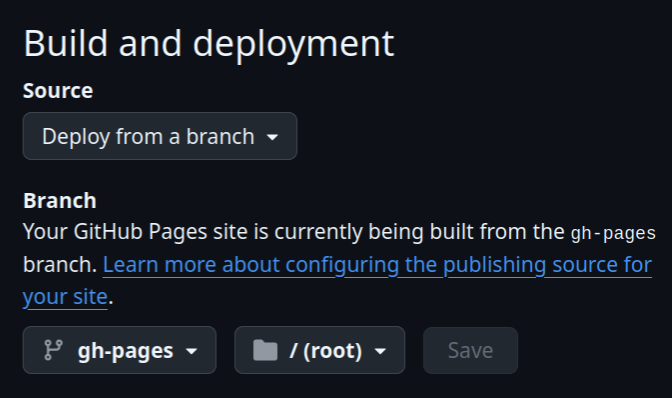 Screenshot of the Pages settings in the repositories settings.
To link these to Canvas, I can include a url to the files (for PDFs) or a direct link to the website url for the HTML versions. But I decided to take advantage of the iframe embed code. I created a page on my Canvas course, and simply copied and pasted the embedded iframe HTML code into the page’s HTML editor.
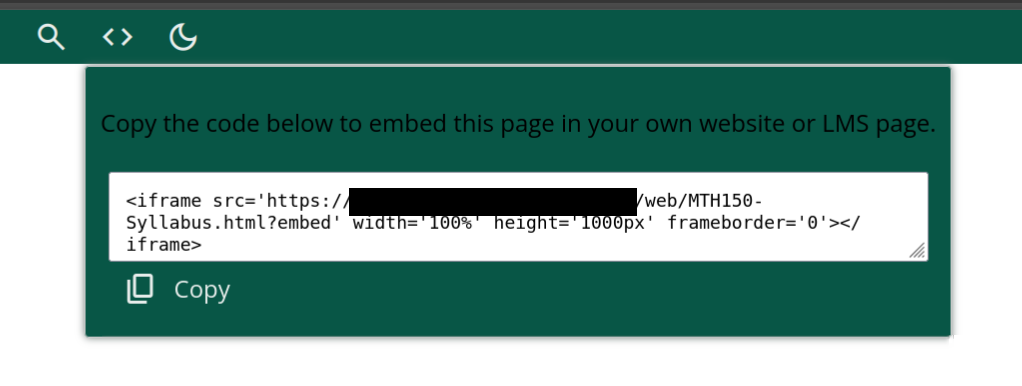 iframe code for embedding.
Now I have a page on my Canvas site that I never need to update: it will automatically show the web version of the syllabus for that course, and will reflect any changes I make (since the content is not actually hosted on Canvas).
Last, I built a folder in the “syllabi” directory called “site,” which allows me to include files for the website that is deployed as a GitHub page. For instance, I could build an index.html file, include some CSS files, and create a nice landing page for my syllabi. All that I have done, so far, is created an “archived” folder. This includes the previous semesters’ syllabi as PDFs. I rename each one based on the year and semester, and move it there before beginning the edits for a new semester.
Is This Better?
Like anything, I will still probably make some changes. After prepping my syllabi for the beginning of this Spring semester, I got to test how the editing worked as well as revisit my organization. I know I would like to reorganize a couple of things: maybe I should split the some pages into more granular ones, with their <xi:include/> structure. I would still like to automate more of my course calendar and reduce the amount of fiddling I have to do.
And I still have a million of little clicky tasks to do on Canvas. I don’t think that’s ever going to go away. But at least the number of clicky tasks that I have are fewer and these specific ones are less annoying!
Cheers to the beginning of the Spring 2026 semester, and hopefully the end of the clicky stuff until August, when I have to prep for the Fall semester.
Related
- For more information on PreTeXt, visit PreTeXt.org.
- The MathTech.org website has some more blog posts on interesting ways of using PreTeXt and other open-source math tech for teaching.
Footnotes
-
Why are there three dates for every assignment and why are they never in the order I expect them to be? ↩
-
Fact Sheet: New Rule on the Accessibility of Web Content and Mobile Apps Provided by State and Local Governments ↩